

For parents
Where your child is, and where they have been
Your child's own page — the status as the headline, the arrivals and departures behind it, the one way to tell the school something, and the attendance history.
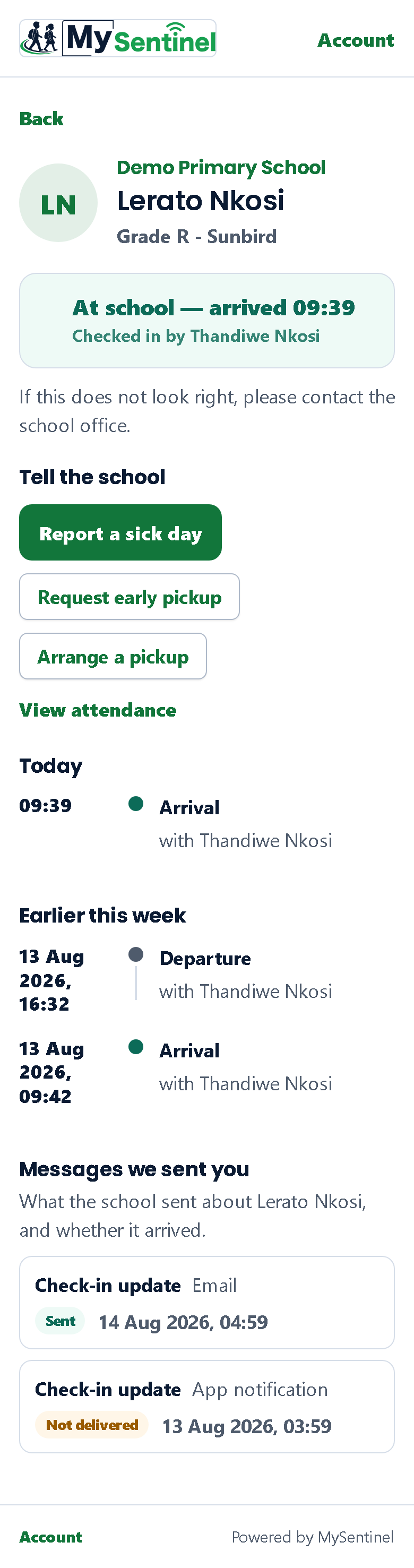
Tapping a child’s row opens their own page. This is where you go when the one line on the front is not enough — when you want the time, or the name of the adult who was with them, or the record of the days behind today.
Moving between your children
If you have more than one child at the school, a row of first names sits at the top of the page with the one you are looking at marked. Tap another and you are on their page.
It is a small thing that removes an irritating one. Before it existed, seeing your second child meant going back to the front, finding their row and tapping it — three moves to answer a question you were already halfway through asking. The row of names costs nothing to load, because the portal already knows who your children are.
The answer, at the top
The child’s name and class sit above as a small line — you know who your own child is, and you tapped their row to get here. What is written large is the thing you came for: At school, or Left school, or Not checked in yet, with the time underneath — since 09:41, at 14:30.
Under that, where it is worth saying, is the adult who was with them — Checked in by Thandiwe Nkosi. That line now appears only when the person who did it was somebody other than you. It used to appear every time, which meant a parent who had dropped their own child off read their own name back at them on every visit. Told about somebody else, it is the most useful line on the page; told about yourself, it is noise. It is the difference between knowing your child left and knowing who they left with.
If your school has given the portal a phone number, one quiet line follows — Not right? Call, with the school’s own number written out beside it. It is there because you are the person most likely to spot that something is wrong, and the school would far rather hear from you than not. If the school has not given a number, the line is not shown at all, rather than telling you to phone an office it cannot name.
Telling the school something
One button sits under the status: Tell the school…. It opens a panel that slides up from the bottom of the screen with five choices — a sick day, arriving late, fetching your child early, somebody else fetching them, or anything else. Each one opens its form already filled in for this child, so you never have to pick them again from a list.
There used to be four separate buttons here, three of them looking identical and two of them about pickups. A parent does not arrive with four thoughts. They arrive with one — something about today is different, and the school should know. The next chapter covers what each of the five choices does.
Today, and earlier this week
Today lists every arrival and departure recorded so far, each with its time and the adult who was with them. A break in the middle of the day, a child signed out and brought back — it is all there, in order.
Earlier this week does the same for the days before. That is as far back as this page reaches. For anything older, the attendance view below is the right place; it thinks in days rather than in individual scans.
If the page is empty, it says so plainly rather than showing you a blank space, and it says it differently depending on whether your child is at school right now or whether nothing has been recorded at all.
What is no longer here
This page used to end with a table of every message the school had sent you about this child, with the channel each went out on and whether it was delivered. It is gone, and its removal was deliberate.
The need behind it is real — settling “nobody told me” without a phone call is worth doing. But the answer to it is not a delivery report filed under a child’s name. A parent who reads that a message was not delivered, directly beneath their child’s photograph and status, reads it as something about the child. Whether the school can reach you is a fact about your phone and your inbox, and it belongs with the rest of your contact settings, which is where the chapter on how the school reaches you covers it.
The attendance history
View attendance opens a longer view of the same child, and it is built to be read in three widths. It is the one screen in the portal that still carries a back control, because it is the one screen with exactly one place to go back to — and the control names it, reading Back to Zanele rather than a bare arrow.
This week is a strip of five chips, Monday to Friday. Each carries a word as well as a colour — Present, Late, Absent, or No record — because colour on its own is no use to a parent who cannot easily tell the tints apart.
A day marked absent that the school has an explanation for says so underneath: Sick note received while it is waiting, or Sick note acknowledged by the school once somebody there has confirmed it. That is how you check, days later, that the note you sent actually landed.
This term so far leads with a single large number — the share of school days this child has been at school — with the count of present, late and absent days beneath it, the number of school days it was measured against, and which term it covers and from what date.
Last 4 weeks draws one bar per school week, so a run of bad weeks is visible as a shape rather than as a number you have to compare against a number you have forgotten.
Two things about how those numbers are worked out. A day counts as late when the first scan of the day falls after the cut-off time your school has set — that is the school’s own definition, not a different one invented for parents. And the percentage counts only days the school was actually open, so holidays and closed days never drag it down.
Absent days are shown in a muted amber, never red. A child who was off sick is not an emergency, and spending the emergency colour on an ordinary absence would make it mean less on the day it matters.