

For parents
Asking to collect your child early
Making an early pickup request, who decides it, what the gate is told once it is approved, how to follow or cancel one, and the twin form for a child who will arrive late.
Something has come up and your child needs to leave before the end of the day. You could phone the office and hope the message reaches the gate in time. Or you can ask here, and let the answer reach the gate by itself.
Making the request
Open your child’s page, tap Tell the school…, and choose I’m fetching them early.
The form asks four things, and three of them are already answered. Which child — it opens on the child whose page you came from, which is the whole reason the choice is made there rather than here. Time picking up — the time of day you will be there, starting at an afternoon time, because an early pickup is an afternoon event. Who is collecting — that is you, and it is shown rather than asked. Reason (optional) — a short note if there is something the school should know. You can leave it blank.
That pre-filled child matters more than it looks. The form used to default to whichever child the school listed first, so a parent who opened one child’s page, tapped through and submitted without noticing the picker had told the school about a different child entirely. It is a one-tap mistake on a safety screen, and it is now impossible to make by accident.
Then Submit. The school is not obliged to say yes, and the page is honest about that from the start:
Submitted. The school will review this request before releasing your child.
Following it
While a request is still live — waiting for an answer, or approved and not yet used — it is pinned to the top of your Messages tab under Happening now, with the time you asked for and an Open link beside it. That is where you will see it without going looking, because it is one of the few things in this portal that is still true rather than merely recorded. Once it is settled it drops into the history below with everything else.
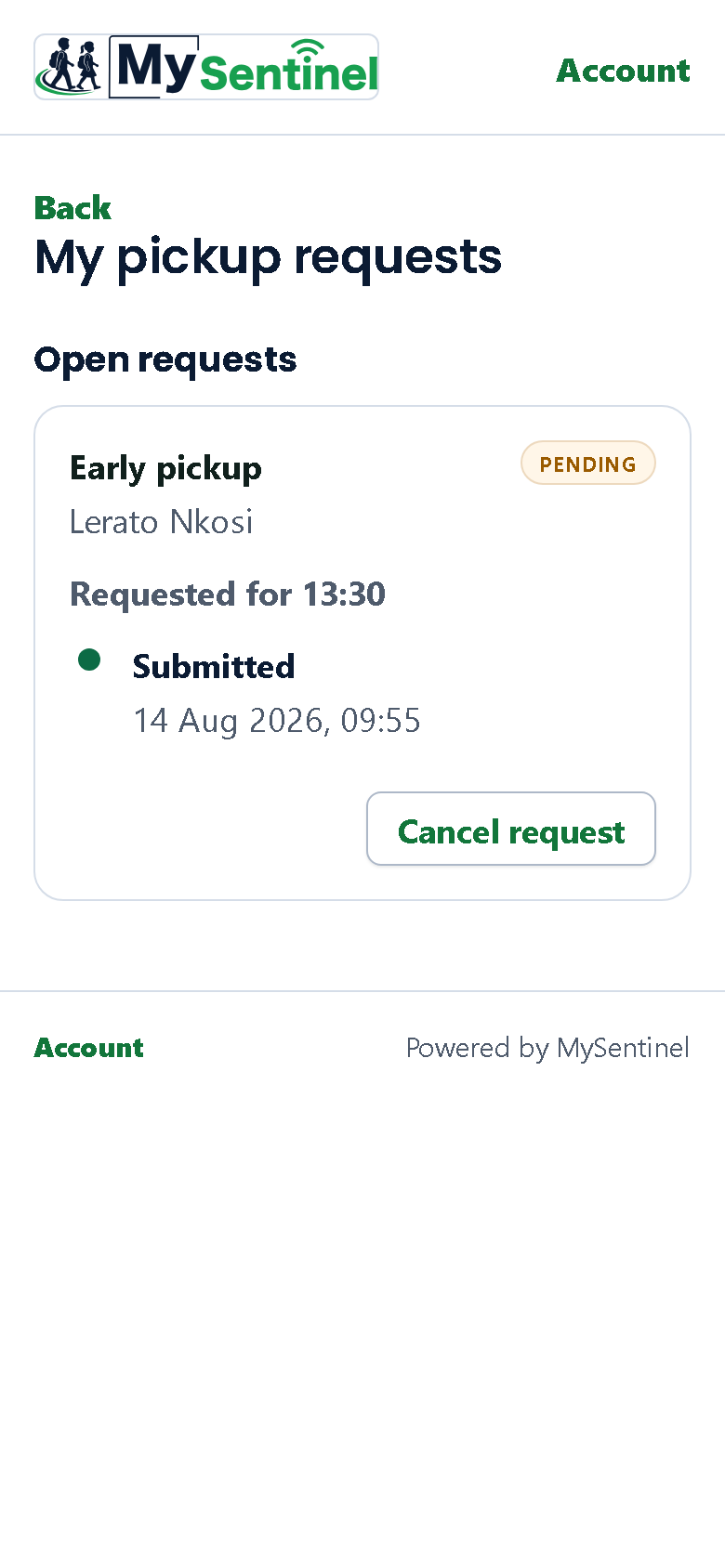
Open takes you to the full list of your requests, which holds everything you have asked for in the last month, split in two. Open requests are the ones still live. Last 30 days holds the ones that are settled. A notification about a particular request still lands you on it directly.
Each card names what you asked for and for which child, the time you asked for, and a status chip:
- Pending — amber. Nobody has answered yet.
- Approved — green. It is agreed.
- Denied — amber, not red. The school has said no, which is a decision you can do something about — phone the office, ask again tomorrow — and not an emergency. Nothing this portal tells a parent is ever red.
- Completed — the child has actually been collected.
- Cancelled — you or the school withdrew it.
- Expired — the day went by without it being used.
Under the chip, the card keeps a running list of what has happened to the request, newest at the bottom: Submitted, then Approved by the class teacher or Approved by the school office, and finally Completed at the gate. If it was refused you see Denied by the class teacher or Denied by the school office.
You are told who decided it because it changes who you would talk to about it. You are never shown that person’s name — the role is what you need, and the name is theirs.
What approval actually does
Approving your request is not just somebody ticking a box in an office. When your child’s badge is scanned at the gate, the officer’s screen shows them that an early pickup has been approved for that child at that time, and which adult is expected.
That is the whole point of asking here rather than by phone. The officer does not have to take a stranger’s word for it, and you do not have to be found on a phone to confirm anything. You also get the school’s answer sent to you on your usual channels, in your language, so you are not left refreshing this page.
Changing your mind
While a request is still waiting, Cancel request appears on its card. It asks you to confirm, and tells you what confirming means:
The school will no longer act on it.
Two limits are worth knowing. You can only cancel a request you made yourself — if your child’s other parent asked for the pickup, you will see it here but the button will not be there for you. And you can only cancel one that is still waiting; if the school answered it while you had the page open, the card tells you so and refreshes itself rather than pretending.
Once a request has been decided, withdrawing it is the school’s to do. Ask them.
The other half: arriving late
The same form, from the other end of the day, now has its own door. Will be late today in the same panel tells the school to expect your child later this morning, and it is a notification rather than a request — you are informing them, not asking their permission:
Sent. The school knows to expect your child later this morning.
It asks the same four things, worded for what it actually is: the time your child will arrive rather than the time you will fetch them, opening at a morning time rather than an afternoon one, and naming you as the person telling the school rather than as the person collecting. Those sound like small differences. They are the difference between a form that fits what you are doing and a form that hands a parent reporting a late drop-off a default of two in the afternoon and asks who will be collecting.
Telling the school your child will be away on a named day is the one thing still without a form of its own. A request in this system carries a time and no date, which is exactly the wrong shape for a day that has not happened yet, and offering a door that quietly recorded it against today would be a worse answer than not offering one. Send that as a message instead; a later chapter covers how.