

At the gate
When a badge is read
What happens the instant a badge is scanned — who is recorded straight away, who comes to you for a decision, and why the difference exists.
A badge reaching the phone does one of two things, and which one depends on the learner — not on you, and not on which button you press.
Most learners are recorded straight away
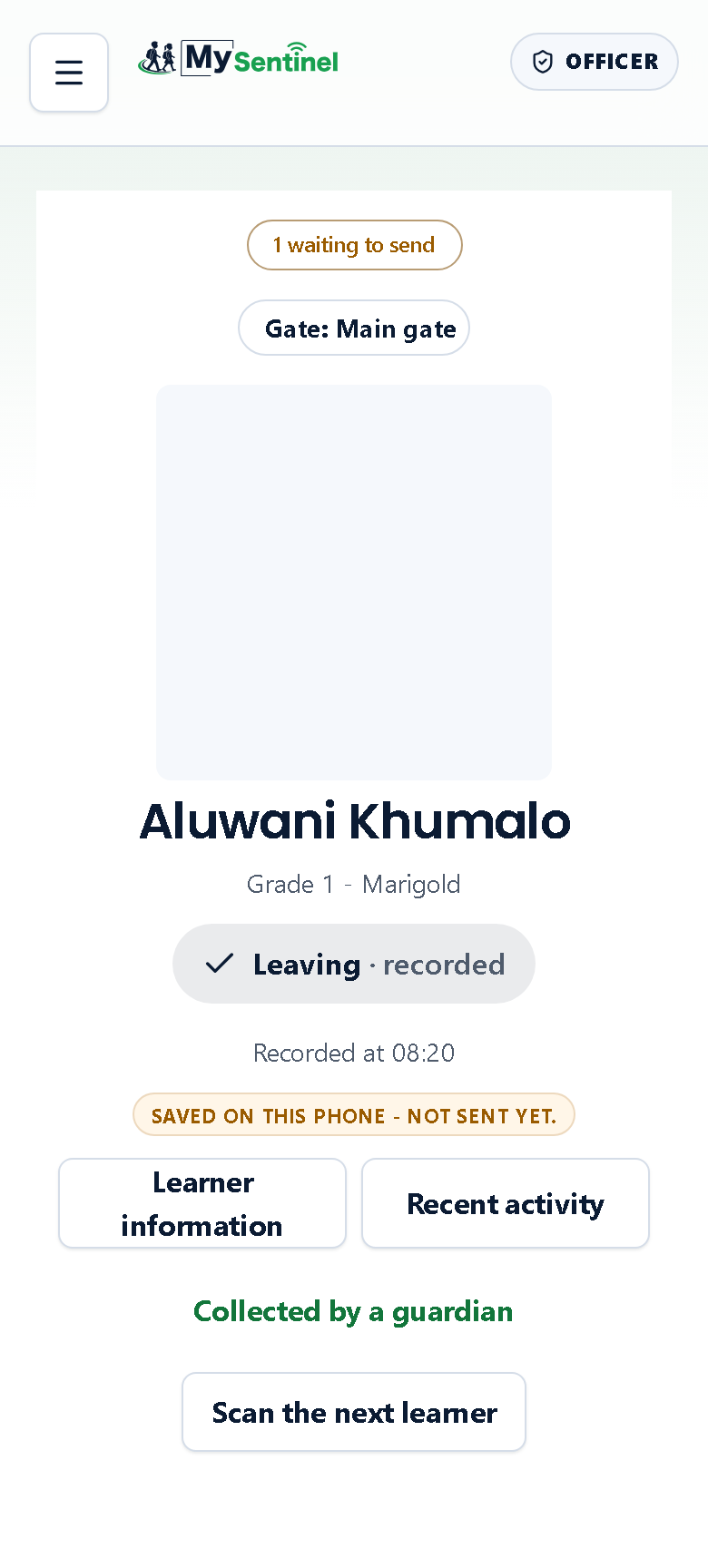
For a learner going home on their own, the scan is the record. The phone shows you what it did rather than asking you what to do:
- the learner’s photo, or their initials if the school has not added one yet
- their name, and their grade and class beneath it
- what was recorded — Leaving · recorded, or Arriving · recorded
- Recorded at 14:32, the time it went down
- whether it has reached the school yet
Underneath sit four things you can do next: Learner information, Recent activity, Collected by a guardian, and Scan the next learner.
You do not have to do any of them. The record is already made. This screen is a receipt, not a form.
Some learners always come to you
Five kinds of learner never get recorded automatically, whatever the school’s settings say. They are listed here in the order the phone reports them, most serious first, because a child can easily be more than one at once:
- a learner under a custody arrangement
- a learner where somebody is barred from collecting them right now
- a learner with an approved delegate named for that day
- a learner with an approved pickup arranged for that day
- a learner who needs a guardian present to be released
For those, the phone stops and asks you to confirm who is collecting them. That is deliberate: these are exactly the cases where getting it wrong matters most, so the system refuses to be quick about them.
Why it works this way. Recording a self-release learner instantly is what keeps a queue of two hundred children moving at home time. Stopping for the three categories above is what keeps the one child who must not leave with the wrong adult from doing so. The same setting produces both behaviours.
If it recorded the wrong thing
The receipt stays on screen until you scan the next learner, and Collected by a guardian is live the whole time. Tap it, choose the adult who is actually there, and the record is corrected — the screen confirms with Updated - collected by and the name.
There is no time limit on this. The correction is available for as long as the receipt is in front of you.
Choosing the adult used to be a separate screen. It is not any more — it happens on the receipt itself, without leaving the gate. Officers who saved a link to the old screen, or who reach it with the back button, land back on the gate, which is where the choice now lives. Nothing was lost in the move; the screen simply stopped being somewhere you had to travel to and back from between two children.
Learners with no photo
If the school has not uploaded a photo, you will see the learner’s initials instead, with a line reading No photo on file — confirm who you’re releasing another way.
Treat that as an instruction, not a warning to dismiss. It means the phone cannot help you confirm identity, so you do it by sight or by asking.
Who can change this
The setting that decides whether self-release learners are recorded instantly is not in your school’s own settings. It is set by MySentinel for the school, and it is switched on when a school starts. If your school wants an officer to confirm every single check-in and check-out, that is a request to MySentinel, not a setting your administrator can change.